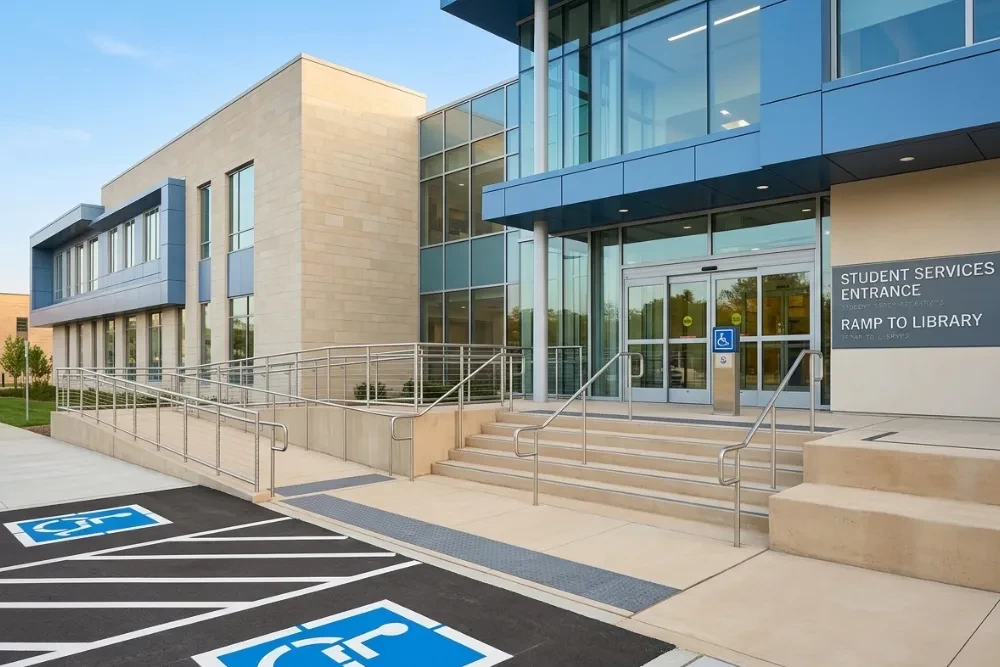
Introduction: Why ADA Compliance Should Be on Every University Leader’s Radar
ADA (Americans with Disabilities Act) compliance is not just a checkbox in online education — it’s a legal, ethical, and educational imperative. Yet many universities and colleges continue to overlook or under-resource this critical area. The consequences can be profound: from legal liability and public embarrassment to student disengagement and barriers to learning for students with disabilities.
As higher education institutions expand their online offerings, ADA compliance must be at the forefront — not an afterthought. At Babb Education, we’ve seen hundreds of courses, syllabi, and LMS shells across institutions. We know what’s getting missed, what’s done well, and where cleanup is desperately needed.
This article explores what university leaders need to know about ADA compliance, what’s often missed, and how Babb Education partners with your internal teams to resolve these issues without disrupting your existing instructional design workflows.
What ADA Compliance Means in Online Learning
ADA compliance means ensuring that your online learning environments are equally accessible to all students, regardless of physical, visual, auditory, cognitive, or learning disabilities. This includes:
- Content that is screen reader friendly
- Captioned videos
- Proper color contrast
- Keyboard navigability
- Alt text for images
- Logical, consistent navigation structures
- Time-based accommodations
- And more
Importantly, Section 508 of the Rehabilitation Act and WCAG (Web Content Accessibility Guidelines) also guide compliance standards for digital content — and institutions must be compliant with both.
10 Common ADA Violations We See in Online Courses
Whether we're refreshing an existing course or reviewing a new build, we often find these critical issues:
- Missing or Inaccurate Alt Text
Images, infographics, and even charts are often missing alternative text descriptions. Or worse, they're labeled as "image1.png" — a missed opportunity for accessibility and SEO. - Videos Without Captions
Auto-generated YouTube captions aren't sufficient for compliance. Videos should have accurate, human-reviewed captions and transcripts whenever possible. - Poor Color Contrast
That trendy gray-on-white or yellow-on-light-blue design? It may be on-brand, but it's also unreadable for students with visual impairments or color blindness. - PDFs That Aren't Screen Reader Compatible
Faculty often upload scanned PDFs or files created in Word that aren't tagged for screen readers. These documents are inaccessible by default. - Lack of Keyboard Navigation
All content and interactions should be accessible via keyboard — not just a mouse. Many interactive elements (quizzes, buttons, dropdowns) fail this basic test. - Inaccessible Course Navigation
Menus, links, and LMS buttons often lack consistent structure, confusing screen reader users and requiring unnecessary cognitive load. - Interactive Elements Without Instructions
Drag-and-drop exercises, simulations, and other rich media often don't come with clear directions for students using alternative input devices. - No Accessibility Statement
Every syllabus and course shell should include a clear accessibility statement with procedures and contacts for accommodations. - Timed Assessments With No Alternative Options
Strictly timed tests are not compliant unless flexible options are offered — and these should be baked into the course design, not left to individual negotiation. - No Audit Trail or Documentation
Without documentation or tracking of accessibility efforts, institutions leave themselves legally vulnerable in the event of a complaint or audit.
Why It's Not Getting Fixed — Even with In-House Instructional Design Teams
Many universities have excellent instructional design teams, but they are overwhelmed, under-resourced, or forced to prioritize content deployment over compliance. We hear this all the time:
- "Our team is great — but they're juggling 15 course launches and don't have time for an accessibility audit."
- "We hired an adjunct to build this course. I'm not sure they know WCAG standards."
- "Our LMS vendor said the shell is ADA compliant, but we didn't check the actual content."
Even with the best intentions, ADA often gets deprioritized — and that's where Babb Education comes in.
What Babb Education Does Differently
We don't replace your team. We come in as your cleanup hitters, side-by-side with your internal designers, content creators, and tech leads.
Here's how we work with institutions. Among many other things, specifically related to ADA, we can help with:
- ADA Compliance Audits
We perform full audits of individual courses or entire programs for ADA compliance, delivering an actionable punch list organized by priority and risk level. - LMS-Ready Fixes
We don't just point out what's wrong — we fix it. From captioning to contrast fixes to redesigning interactive activities, we deliver ready-to-upload solutions. - Accessibility-First Course Refreshes
We'll take outdated or inaccessible courses and transform them into streamlined, compliant, student-centered learning experiences. - Training & Guides for Your Teams
Want to empower your own ID team or faculty builders? We offer just-in-time accessibility training, cheat sheets, and documentation customized to your LMS. - Partnership, Not Replacement
Our job is to extend your capabilities, reduce liability, and make your courses better — without disrupting your workflows or overstepping your internal roles.
7 Tips University Leaders Can Use Today
Here are simple, effective ways to start addressing accessibility today — even before you hire an external team:
- Audit a Random Sample of Courses
Pick 5 random online courses and do a basic audit: Do all videos have captions? Is alt text present? Can the course be navigated via keyboard? This reveals systemic issues. - Embed Accessibility into Course Development Processes
Make it part of your instructional design checklist — not a side project. Every design or refresh should include accessibility steps. - Avoid Over-Reliance on Auto Tools
Captioning tools, LMS accessibility flags, and AI accessibility checkers are helpful but not foolproof. Human review is still necessary. - Ask Faculty to Submit Source Files
Many accessibility issues stem from scanned PDFs and non-editable formats. Ask faculty to submit source documents instead of PDFs whenever possible. - Include Accessibility Statements in Every Course
Train your team to add clear, boilerplate accessibility statements (tailored to your institution) into each course and syllabus. - Create a Central Accessibility Resource Hub
Make it easy for designers and faculty to find tools, examples, and templates related to ADA compliance in your LMS or internal portal. - Don't Assume You're Covered
Just because your LMS says it's "ADA compliant" doesn't mean your course content is. You are still liable for the materials you upload and create.
The Risks of Doing Nothing
- Lawsuits — Public and private institutions have faced major lawsuits from students who couldn't access their online courses — some resulting in six-figure settlements.
- Loss of Funding — Non-compliance with Section 504/508 can affect eligibility for federal funding.
- Brand Reputation — News of accessibility violations spreads quickly — and publicly.
- Student Attrition — Students who can't fully participate in your courses are more likely to drop out — costing you revenue and damaging your retention metrics.
Real Stories from the Field (Yes, These Really Happened)
- A faculty member embedded 10 videos from YouTube, none of which were captioned. No one noticed until a blind student withdrew, citing the course as inaccessible.
- One university uploaded an image-heavy syllabus as a scanned PDF — but no screen reader could access it. A student filed a complaint, and the university scrambled to redo 43 syllabi in 2 weeks.
- An audit revealed that over 60% of courses lacked alt text, triggering a system-wide emergency compliance initiative.
Why This Is the Time to Act
We're entering a new era of increased scrutiny, shifting legal standards, and heightened student expectations. Universities that treat accessibility as a core design pillar — rather than a reactive fix — will emerge as leaders in digital learning.
ADA compliance is no longer just a responsibility. It's an opportunity to create better, more inclusive, more equitable learning environments for everyone.
Final Thoughts: You Don't Have to Do This Alone
Instructional design teams are maxed out. Faculty are undertrained in ADA. Leadership is juggling budget constraints and digital strategy.
Let Babb Education be your ADA compliance partner — quietly fixing what needs fixing, educating your people, and protecting your institution from liability and student harm.
We're not here to replace your team — we're here to support them, reinforce them, and amplify your mission.
A Dani Babb Creation
Ready to talk? Reach out to discuss how we can help your university meet — and exceed — ADA compliance standards.